
 0
0
 0
0
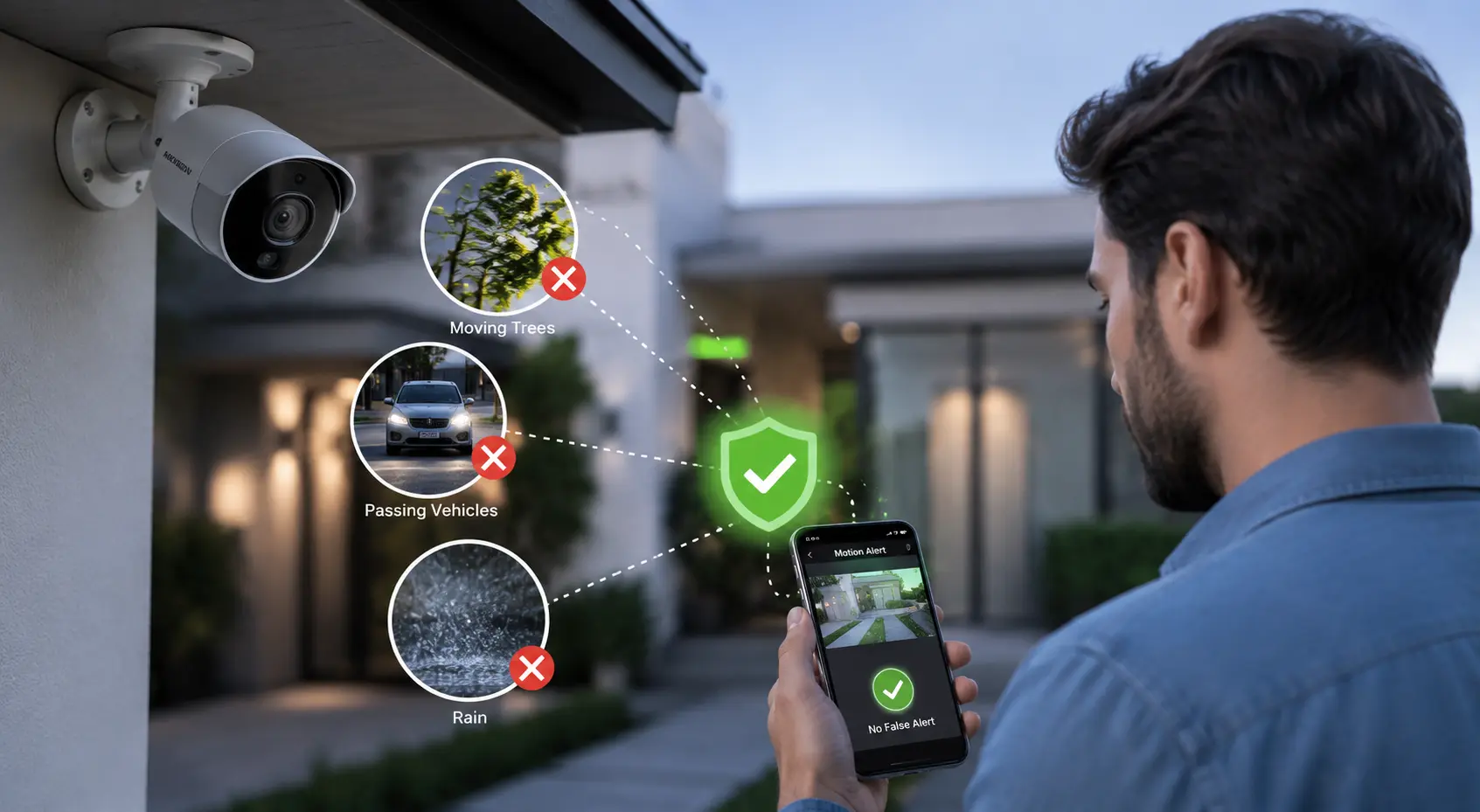
I started searching for ways on How to Reduce False Motion Alerts in CCTV Cameras after my phone kept buzzing every few minutes for completely useless notifications. You probably know how frustrating that gets. One alert comes from moving tree leaves, another from a passing car, and then an insect flying near the lens suddenly triggers motion detection at 3 AM.
After a while, most people stop checking alerts altogether, and that becomes a real security risk when an actual event happens.
Why CCTV Cameras Trigger So Many False Alerts
Most cameras rely on basic pixel movement detection.
The camera simply notices “something changed” in the frame. It doesn’t always understand what changed. That’s why harmless movement becomes an alert.
How to Reduce False Motion Alerts in CCTV Cameras?
We’ve all experienced the frustration of nonstop CCTV notifications that turn out to be nothing important. When I started testing different camera setups, I realized that learning How to Reduce False Motion Alerts in CCTV Cameras is more about smart placement and settings than expensive hardware.
You can reduce unnecessary alerts by adjusting motion sensitivity, creating custom detection zones, and enabling AI human detection features. I’ve also noticed that avoiding reflective surfaces, busy roads, and moving tree branches makes a huge difference.
A properly configured CCTV camera should warn you about real activity — not every shadow, insect, or passing light.
Common Causes of False Motion Detection
Security cameras can sometimes trigger alerts even when no real threat is present.
Tree Leaves in Wind
Moving branches and leaves often trigger outdoor motion sensors repeatedly.
Insects Near Infrared Lights
Bugs flying close to night vision LEDs can appear as sudden motion events.
Vehicle Headlights
Bright headlights passing across the camera view can activate motion alerts.
Rain or Fog
Heavy rain, mist, or fog may interfere with infrared sensors and image detection.
Sudden Lighting Changes
Quick brightness changes can confuse motion algorithms and trigger recordings.
Pets Moving Around
Dogs, cats, or other animals frequently trigger motion alerts near entry areas.
Sunrise or Sunset Shadows
Long moving shadows during sunrise or sunset can create unexpected motion events.
Cheap motion settings are usually configured too aggressively by default. Manufacturers often do this intentionally so users feel the camera is “highly sensitive.”
The result? Endless notifications.
Adjust Motion Sensitivity Properly
This is the first setting most people change — but they usually overdo it. Dropping sensitivity too low creates another problem: the camera may stop detecting actual people.
A better approach:
- Start with medium sensitivity
- Test movement during daytime
- Test again at night
- Reduce sensitivity gradually
- Monitor alerts for 2–3 days
Outdoor cameras typically need lower sensitivity than indoor setups.
Why Night Settings Need Extra Attention
Infrared night vision creates more motion noise. Small insects flying near IR LEDs often appear huge on camera. Many users think someone is walking near the lens when it’s actually a moth hovering close to the light source.
Pro Insight:
A separate external light source often reduces insect-related motion alerts better than relying only on infrared LEDs.
Create Motion Detection Zones
This single feature solves a huge percentage of false motion problems.
Most modern CCTV systems allow custom activity zones. Instead of monitoring the entire frame, the camera only watches important areas.
For example:
- Ignore roads with passing traffic
- Exclude moving trees
- Remove sidewalks from detection
- Focus only on doors or gates
Here’s where many setups go wrong: users monitor unnecessary areas. A front gate camera doesn’t need to monitor the entire street.
Smart Zone Placement Example
Proper motion zone placement improves accuracy and reduces unnecessary alerts.
Good Setup
Bad Setup
Enable Human Detection or AI Motion Detection
Basic motion detection reacts to movement.
AI detection reacts to objects.
That difference matters a lot.
Modern AI CCTV cameras can identify:
- Humans
- Vehicles
- Animals
- Packages
Instead of sending alerts for every shadow or rain drop, the system filters events intelligently.
| Feature | Traditional Camera | AI CCTV Camera |
|---|---|---|
| Motion Detection | Detects all movement | Filters humans & vehicles |
| False Alerts | Very common | Much lower |
| Night Accuracy | Weak | Smarter recognition |
| Notification Quality | Frequent spam | More relevant alerts |
If your camera supports smart analytics, turning it on usually makes the biggest difference immediately.
Change Camera Placement Carefully
A badly positioned camera creates constant alert problems.
Small placement mistakes cause major detection issues.
Common examples:
- Camera facing direct sunlight
- Lens pointed toward busy roads
- Trees constantly moving in frame
- Reflective surfaces causing glare
- Cameras mounted too low
Outdoor cameras should ideally face stable environments.
Key Takeaways
Motion zones reduce unnecessary alerts dramatically.
AI human detection works better than basic motion sensing.
Camera placement impacts detection accuracy heavily.
Night vision reflections commonly trigger false alerts.
Balanced sensitivity settings work better than maximum sensitivity.
One real-world mistake appears often in apartment buildings.
People install cameras facing elevator doors with shiny metal surfaces nearby. Every lighting shift creates motion triggers throughout the day.
Reduce Infrared Reflection Problems
Night vision reflection is heavily underestimated.
Infrared light bouncing off nearby walls, ceilings, or glass creates flickering movement effects.
That fake movement becomes a motion alert.
Common causes:
- White walls too close to camera
- Camera behind glass windows
- Dust or spider webs near lens
- Metallic surfaces reflecting IR light
Cleaning the lens regularly helps more than many users expect.
A thin spider web near infrared LEDs can generate nonstop alerts all night long.
Use Scheduled Motion Alerts
Not every hour needs active notifications.
A smart schedule dramatically reduces unnecessary alerts.
Example:
- Enable alerts only at night
- Disable notifications during office hours
- Activate full monitoring during vacations
This works especially well for:
- Shops
- Warehouses
- Offices
- Parking areas
Many business owners accidentally overwhelm themselves by monitoring active daytime environments where movement is constant and expected.
Update Camera Firmware Regularly
Older firmware versions often contain poor motion detection optimization.
Manufacturers improve AI filtering and detection logic through updates.
Many people never check firmware after installation.
That’s a mistake.
Recent firmware updates frequently improve:
- Human recognition
- Vehicle filtering
- Night detection
- Motion algorithms
- Notification accuracy
Check your camera app or NVR settings once every few months.
Internet Lag Can Also Create Motion Alert Issues
Delayed network communication sometimes duplicates alerts.
Weak Wi-Fi connections create strange notification behavior, especially with cloud-based cameras.
Signs include:
- Duplicate alerts
- Delayed notifications
- Missing thumbnails
- Random repeated triggers
Wired Ethernet connections remain far more stable than Wi-Fi for CCTV systems.
Pro Insight:
A strong surveillance setup depends more on stable networking than ultra-high video resolution.
Decision Guide: Which Motion Detection Setup Works Best?
| Situation | Best Solution |
|---|---|
| Outdoor home camera near road | Motion zones + lower sensitivity |
| Frequent night alerts | Reduce IR reflection + AI detection |
| Pet movement indoors | Enable human-only detection |
| Busy commercial environment | Use scheduled alerts |
| Constant tree movement | Reposition camera or exclude zone |
Common Mistakes That Make False Alerts Worse
Some users unknowingly increase motion problems while trying to fix them.
Biggest mistakes include:
- Setting sensitivity to maximum
- Monitor entire wide-angle frames
- Ignore firmware updates
- Install cameras too low
- Rely only on infrared night vision
- Keep dirty lenses untouched for months
False alerts usually come from poor setup decisions — not defective cameras.
Read Also: Real or fake security cameras: how to spot a fake security camera
Key Takeaways
Important lessons for improving motion detection accuracy and reducing false alerts.
Motion zones dramatically reduce unnecessary alerts and improve monitoring accuracy.
AI-powered human detection performs much better than traditional motion sensing alone.
Proper camera placement affects detection accuracy more than most users realize.
Night vision reflections are one of the most common causes of false notifications.
Balanced sensitivity settings work better than simply using maximum sensitivity.
To reduce false motion alerts in CCTV cameras is mostly about smarter configuration, not expensive upgrades. A properly tuned system becomes quieter, more accurate, and far easier to trust when a real alert actually appears.
FAQ: How to Reduce False Motion Alerts in CCTV Cameras
Why does my CCTV camera send motion alerts even when nobody is there?
I noticed this usually happens because the camera detects general movement instead of identifying actual people. Tree branches, shadows, insects, headlights, rain, and even sudden lighting changes can trigger alerts. You can reduce this problem by adjusting motion sensitivity and creating custom detection zones.
What is the best sensitivity setting for CCTV motion detection?
I found that medium sensitivity works best for most homes and offices. Extremely high sensitivity creates constant false alerts, while very low sensitivity may miss real activity. You should test settings during both daytime and nighttime before finalizing the setup.
Do AI CCTV cameras reduce false motion alerts?
Yes, AI-enabled CCTV cameras reduce false motion alerts significantly. I’ve seen AI detection filter humans, vehicles, and pets separately instead of reacting to every small movement. That makes notifications far more accurate compared to traditional motion detection systems.
Why do CCTV cameras trigger more false alerts at night?
I noticed infrared night vision creates extra motion noise because insects fly near the IR lights and reflections become stronger in dark environments. Spider webs, dust, rain, and reflective surfaces also increase nighttime false alerts.
Can moving trees trigger CCTV motion alerts?
Yes, moving branches and leaves are one of the biggest causes of false motion alerts in CCTV cameras. You should either reposition the camera or exclude trees from the motion detection zone.
How do motion detection zones work?
Motion zones allow the camera to monitor only selected areas instead of the entire frame. I usually recommend focusing on gates, entrances, and driveways while excluding roads, sidewalks, or unnecessary background movement.
Does internet connection affect motion alerts?
Yes, unstable internet connections sometimes create delayed or duplicate notifications. I’ve seen wired Ethernet connections perform much more reliably than weak Wi-Fi setups for CCTV systems.
Should I keep motion alerts active all day?
Not always. I prefer scheduled motion alerts for offices, shops, and warehouses because daytime movement is often normal. Night-only monitoring usually creates cleaner and more meaningful notifications.
Can dirty camera lenses cause false alerts?
Yes, dust, water spots, and spider webs near the lens can confuse infrared night vision and create fake movement patterns. Regular lens cleaning improves motion detection accuracy more than many users expect.
What is the fastest way to reduce false motion alerts in CCTV cameras?
I’ve seen the biggest improvement come from combining these three changes:
✓ Enable human or AI detection
✓ Create custom motion zones
✓ Reduce sensitivity slightly
That combination usually cuts down unnecessary alerts immediately.