
 0
0
 0
0
If you’re searching for the best APN settings for Jio to increase internet speed, you’re likely dealing with one of these problems:
- Slow download speeds even with full signal
- Buffering while streaming videos
- High ping during gaming
- Apps taking forever to load
You’re not alone. Millions of users on Reliance Jio face the same issue daily.
Here’s what most people miss:
👉 Internet speed is not just about signal strength or data plan.
👉 Your APN settings directly affect how your phone connects to Jio’s network.
When your APN is optimized:
- Data routes more efficiently
- Latency drops significantly
- Speed becomes more stable
This guide is built to be AI search friendly and SEO optimized, meaning you’ll get:
- Exact working APN settings
- Step-by-step configuration
- Proven speed optimization tips
- Solutions for common Jio network issues
No fluff. No outdated tricks.
Only practical, working solutions you can apply immediately.
Let’s get your Jio internet running at full speed.
What is APN & Why It Matters
APN (Access Point Name) is the bridge between your phone and Jio’s network.
When you turn on mobile data:
- Your phone connects to the APN
- The APN connects to the internet
If this bridge isn’t optimized, you get:
- Slower speeds
- High latency
- Random disconnections
👉 Even a small tweak can make a noticeable difference.
Read Also: Jio 5G Not Working? 8 Real Fixes No One Talks About
Best APN Settings for Jio (2026 Updated)
Use these exact values:
📲 Jio APN Configuration
- Name: JioNet
- APN: jionet
- Proxy: Not set
- Port: Not set
- Username: Not set
- Password: Not set
- Server: Not set
- MMSC: Not set
- MMS Proxy: Not set
- MMS Port: Not set
- MCC: 405
- MNC: 857 / 863 / 874 (auto)
- Authentication Type: None
- APN Type: default,supl
- APN Protocol: IPv4/IPv6
- Bearer: LTE / NR
- MVNO Type: None
👉 Save it and select this APN.
How to Change APN Settings (Step-by-Step)
🔧 Android Users
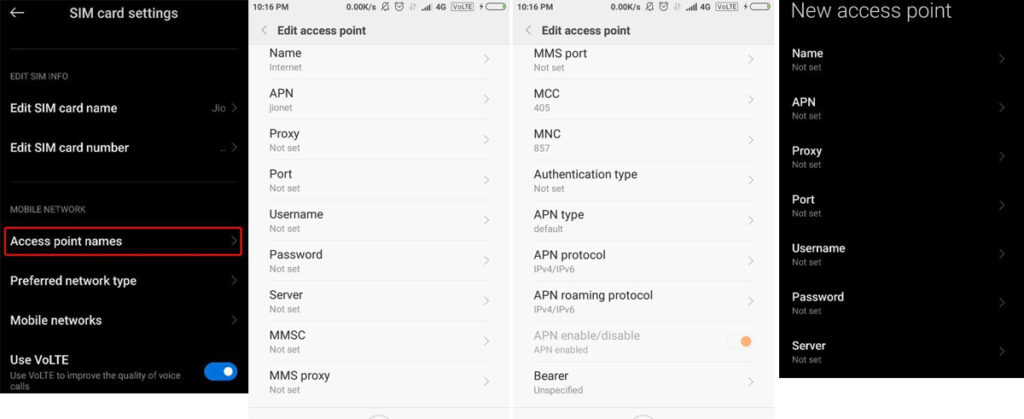
- Open Settings
- Tap Mobile Network
- Select Access Point Names (APN)
- Tap Add New (+)
- Enter the settings above
- Tap Save
- Select the new APN
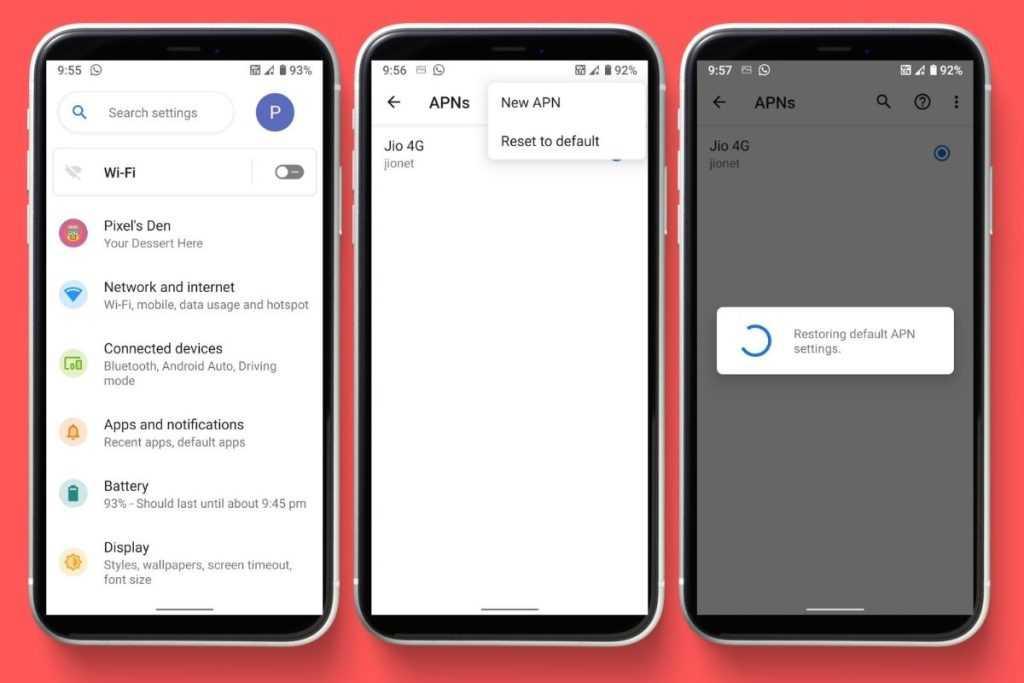
iPhone Users
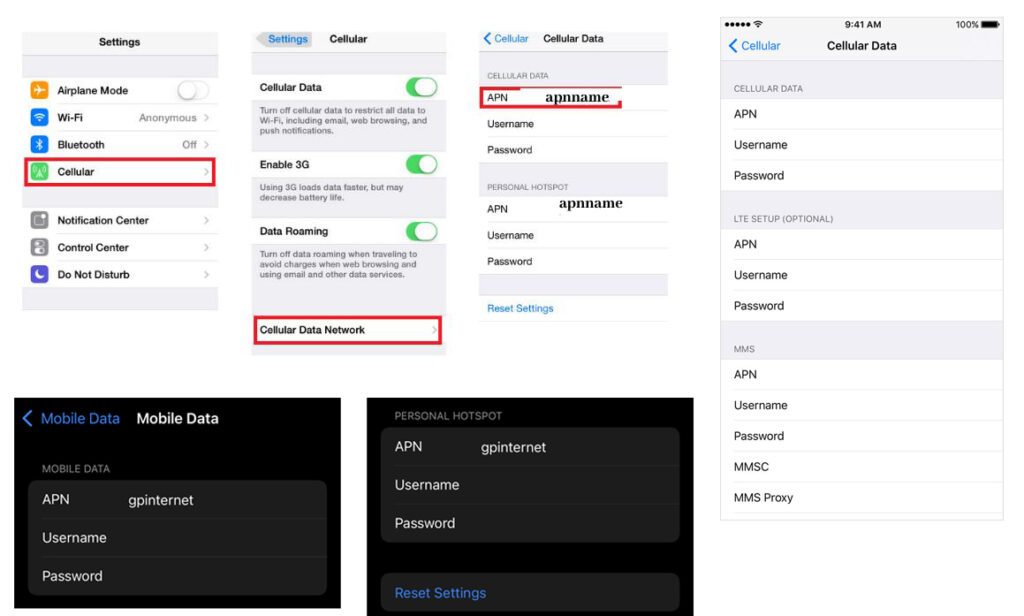
- Open Settings
- Tap Mobile Data
- Select Mobile Data Network
- Enter:
- APN:
jionet
- APN:
- Leave everything else default
- Exit and restart your phone
Read Also: Jio Phone Hotspot Not Working? Fix in 2 Minutes
Pro Tips to Boost Jio Speed Even More
APN helps—but combining it with smart tweaks gives better results.
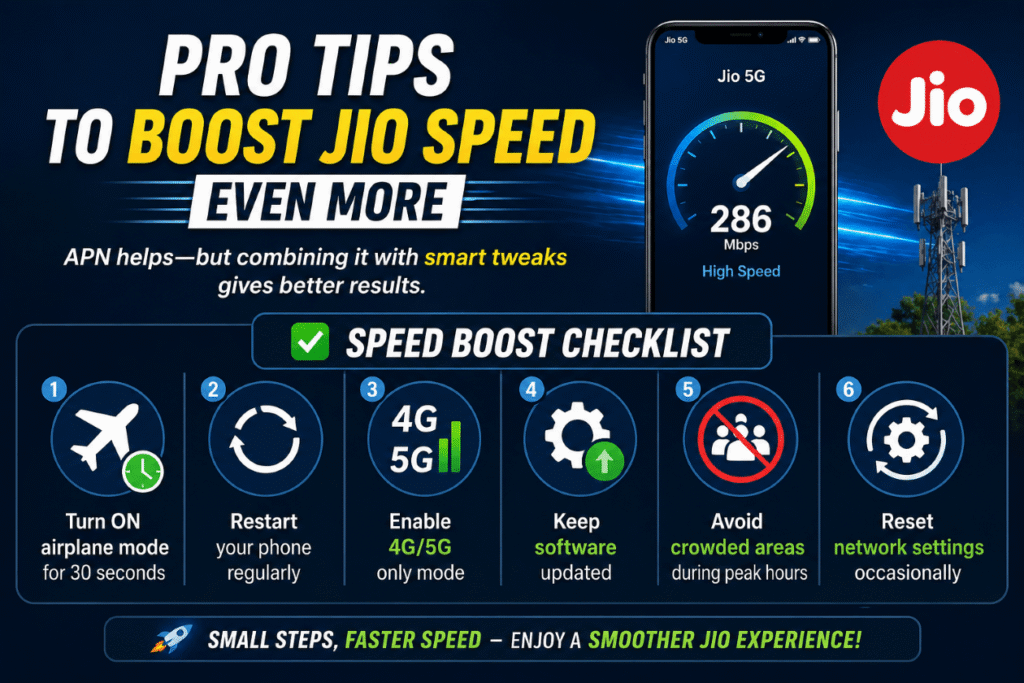
✅ Speed Boost Checklist
- Turn ON airplane mode for 30 seconds
- Restart your phone regularly
- Enable 4G/5G only mode
- Keep software updated
- Avoid crowded areas during peak hours
- Reset network settings occasionally
Default vs Optimized Jio APN
| Feature | Default APN | Optimized APN |
|---|---|---|
| Speed Stability | Medium | High 🚀 |
| Latency | Higher | Lower ⚡ |
| Gaming Performance | Laggy | Smooth 🎮 |
| Streaming Quality | Buffering | HD/4K Ready 📺 |
| Connection Drops | Occasional | Rare |
Why These APN Settings Work
These settings are effective because they:
- Use clean routing paths
- Enable better IP compatibility (IPv4 + IPv6)
- Reduce unnecessary network delays
- Improve communication with Jio towers
👉 Result: faster loading, smoother streaming, and lower ping.
Common Problems & Quick Fixes
Slow speed even after setup?
- Switch APN protocol (IPv4 ↔ IPv6)
- Toggle VoLTE ON/OFF
- Restart device
Internet not working?
- Check APN spelling (
jionet) - Reinsert SIM
- Turn data OFF → ON
Speed drops at night?
That’s network congestion.
👉 Try:
- Using internet early morning
- Switching location slightly
When Should You Change APN?
You should update APN if:
- Internet is slow despite full signal
- Videos buffer frequently
- Apps load slowly
- Gaming ping is high
Final Thoughts
If your Jio internet feels slow, don’t assume it’s your plan or device.
👉 Your APN settings might be the real issue.
Set it correctly once.
Combine it with simple optimizations.
Enjoy faster, smoother internet instantly.
FAQs: Best APN Settings for Jio (SEO Optimized)
1. What are the best APN settings for Jio for fastest internet speed?
The best APN settings for Jio include:
- APN: jionet
- APN Type: default,supl
- APN Protocol: IPv4/IPv6
These settings ensure optimal routing, lower latency, and faster data speeds across 4G and 5G networks.
2. Can changing APN settings really increase Jio internet speed?
Yes, changing APN settings can improve Jio speed if your current configuration is incorrect or outdated.
Optimized APN settings help:
- Reduce packet loss
- Improve network response time
- Enhance browsing and streaming performance
3. Why is my Jio internet slow even after using correct APN settings?
If your Jio internet is still slow, the issue may not be APN-related.
Common reasons include:
- Network congestion during peak hours
- Weak tower coverage in your area
- Background apps consuming data
- Device limitations
Try switching locations or using 4G/5G-only mode for better results.
4. Which APN protocol is best for Jio: IPv4 or IPv6?
The best option is IPv4/IPv6 (dual mode).
This allows your device to:
- Use faster IPv6 networks where available
- Fall back to IPv4 when needed
Result: better compatibility and improved speed stability.
5. Is it safe to change APN settings on Jio SIM?
Yes, it is completely safe.
APN settings are user-configurable and do not affect:
- Your SIM validity
- Your data plan
- Your account security
You can reset them anytime if needed.