
 0
0
 0
0
The Jio Phone heating problem is something many users notice while using the JioPhone during charging, long calls, or in areas with weak network signal. This issue is quite common. A little heat is normal in any mobile device, but too much heat can slow down performance and affect battery life.
Many people search for answers like “why Jio Phone gets hot” or “how to fix Jio Phone heating problem.” This guide explains everything in simple and clear language, so it’s easy to understand and apply in daily use.
The causes of heating, quick solutions to cool down the phone, and simple tips to prevent the issue are all covered here. These suggestions follow safe usage practices recommended for devices from Reliance Jio.
Small changes in how the phone is used can help reduce heating and keep it running smoothly.
What is the Jio Phone Heating Problem?
A heating problem occurs when your phone becomes hotter than usual during basic activities like calling, charging, or browsing.
Common signs include:
- Phone feels too hot to hold comfortably
- Rapid battery drain
- Slower performance or lag
- Device heating even when idle
If you notice these regularly, it’s time to take action.
Common Causes of Jio Phone Heating Issues
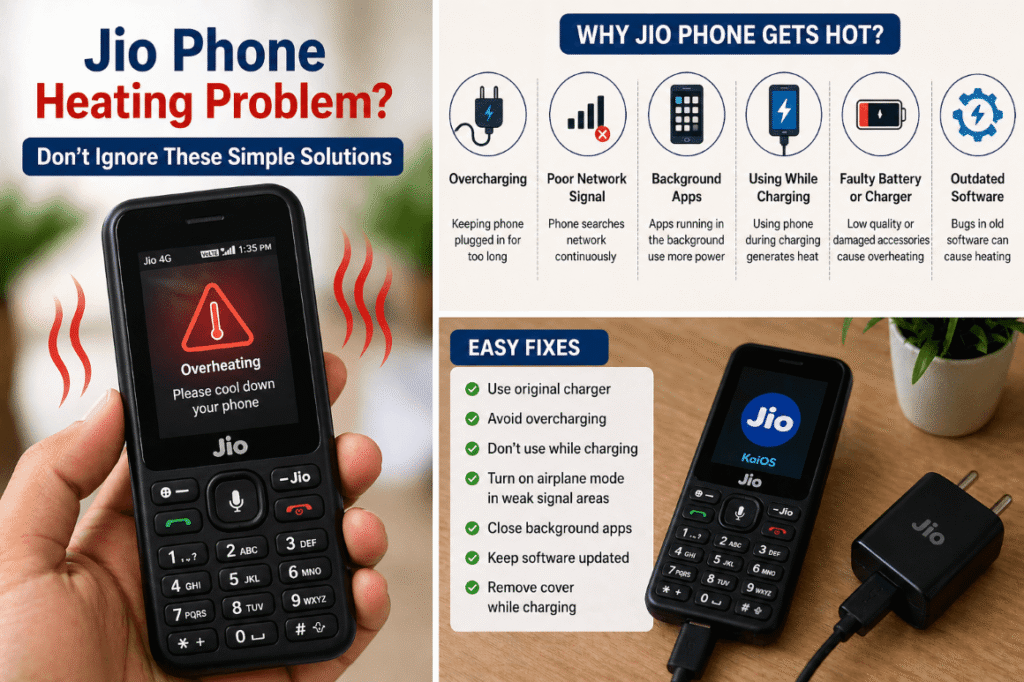
1. Overcharging the Device
Leaving your phone plugged in for long hours—even after it reaches 100%—can stress the battery and generate heat.
2. Background Apps and Processes
Even though the Jio Phone runs on a lightweight OS, multiple apps running in the background can overload its limited RAM and processor.
3. Poor Network Signal
In low-signal areas, your phone continuously searches for a network. This increases CPU usage and leads to overheating.
4. Using Phone While Charging
Using your phone during charging creates a dual load—charging the battery and running apps at the same time—causing temperature spikes.
5. Faulty Battery or Charger
Using duplicate or damaged chargers can lead to inconsistent power flow, which generates excess heat.
6. Outdated Software
Software bugs or outdated versions of KaiOS may cause inefficiencies that lead to overheating.
Read Also: Best APN Settings for Jio (Boost Speed Instantly)
Easy Fixes to Solve Jio Phone Heating Problem
1. Avoid Overcharging
Unplug your phone once it reaches full charge. Avoid overnight charging whenever possible.
2. Close Unused Apps
Make it a habit to clear background apps. This reduces processor load and keeps your phone cooler.
3. Improve Network Conditions
- Switch to airplane mode in weak signal areas
- Move to a location with better coverage
4. Don’t Use Phone While Charging
Let your phone charge without interruptions. This helps prevent unnecessary heat buildup.
5. Use Original Accessories
Always use the original charger and battery provided by Reliance Jio to ensure safe and stable charging.
6. Keep Software Updated
Check for system updates regularly:
- Go to Settings
- Select Device → Software Update
Updates often fix bugs that may cause overheating.
7. Remove Phone Cover While Charging
Phone covers can trap heat. Removing them during charging helps with better heat dissipation.
Read Also: Jio True 5G vs 4G Speed Test – Is It Really Faster?
Advanced Tips to Prevent Overheating
- Avoid using your phone under direct sunlight
- Restart your phone at least once a day
- Limit long sessions of video streaming or gaming
- Keep your phone in a cool, ventilated place
When Should You Be Concerned?
Sometimes, overheating may indicate a deeper issue.
Watch out for:
- Phone heating even when not in use
- Sudden shutdowns
- Swollen battery
- Burning smell or extreme heat
If you notice any of these, stop using the phone and visit a service center immediately.
FAQ About Jio Phone Heating Problem
Why is my Jio Phone heating so much?
Your JioPhone may heat up due to overcharging, poor network signal, background apps, or using the device while charging. In most cases, overheating happens when the processor and battery are under continuous load.
How can I fix the Jio Phone heating problem quickly?
To fix overheating:
- Stop using the phone while charging
- Close all background apps
- Use the original charger
- Keep the phone in a cool place
- Turn on airplane mode in low-signal areas
These steps can instantly reduce heat.
Is it normal for a Jio Phone to heat while charging?
Yes, slight heating during charging is normal. However, if your JioPhone becomes too hot to touch, it may indicate overcharging, a faulty charger, or battery issues.
Why does my Jio Phone heat up even when I’m not using it?
If your phone heats up while idle, it could be due to background processes, weak network signals, or software bugs. Restarting the device or updating the software often resolves this issue.
Can overheating damage my Jio Phone battery?
Yes, continuous overheating can reduce battery life, cause swelling, and impact overall performance. Using genuine accessories from Reliance Jio helps prevent long-term damage.
Does poor network cause Jio Phone heating issues?
Yes. When signal strength is low, your phone constantly searches for a network, which increases CPU usage and generates heat.
How do I cool down my Jio Phone fast?
To cool your phone quickly:
- Turn it off for a few minutes
- Remove the back cover
- Stop charging immediately
- Move to a cooler environment
Avoid placing it in a fridge or near water.
When should I worry about Jio Phone overheating?
You should be concerned if:
- The phone overheats even when idle
- It shuts down automatically
- The battery appears swollen
- There is a burning smell
In such cases, visit a service center immediately.
Which charger is best for avoiding heating issues in Jio Phone?
Always use the original charger provided by Reliance Jio or a certified replacement. Cheap or duplicate chargers often cause overheating.
How do I prevent Jio Phone heating problems in the future?
- Avoid overcharging
- Keep software updated
- Limit heavy usage
- Use original accessories
- Restart your phone regularly
Preventive care is the best long-term solution.
Conclusion
The Jio Phone heating problem is common, but in most cases, it’s easy to fix. By avoiding overcharging, managing apps, and using original accessories, you can keep your phone running smoothly.
Small habits make a big difference. Take care of your device, and it will last longer without performance issues.