
 0
0
 0
0
A lot of people buy lighting products expecting convenience, then end up annoyed by random app issues, delayed sensors, or lights turning on at the wrong time. That’s exactly why the debate around Motion Sensor Bulb vs Smart Bulb keeps getting bigger. One focuses on automatic detection. The other gives full app-based control and automation.
The tricky part? Most buyers don’t actually need every “smart” feature being marketed to them.
Motion Sensor Bulb vs Smart Bulb : The Core Difference
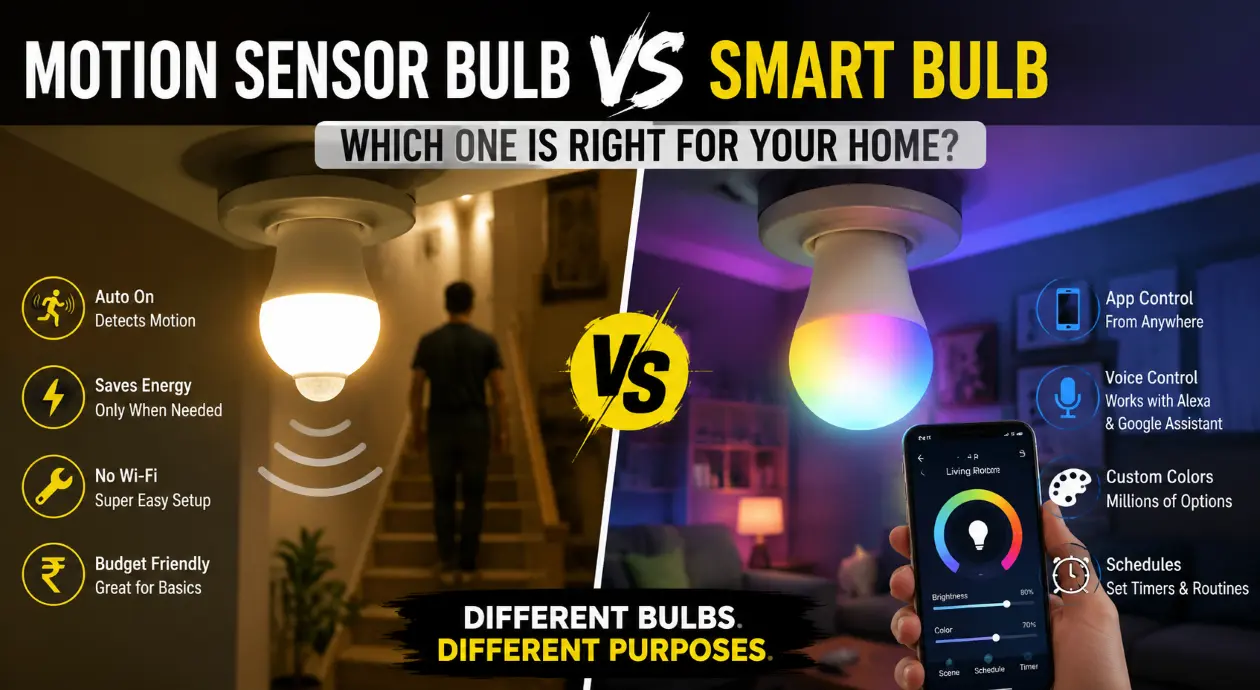
A motion sensor bulb turns on automatically when it detects movement nearby. No app. No Wi-Fi. No setup headaches.
A smart bulb connects to Wi-Fi or Bluetooth and allows remote control through an app or voice assistant.
That sounds simple, but daily usage feels completely different.
| Feature | Motion Sensor Bulb | Smart Bulb |
|---|---|---|
| Works Automatically | Yes | Only with automation setup |
| Needs Wi-Fi | No | Usually Yes |
| Mobile App Control | No | Yes |
| Voice Assistant Support | No | Yes |
| Power Saving | Excellent | Good |
| Installation Difficulty | Very Easy | Moderate |
Why Motion Sensor Bulbs Became So Popular
Nobody wants to walk into a dark staircase carrying groceries and search for a switch.
That’s where motion sensor lighting feels genuinely useful.
Common places people install them:
- Staircases
- Bathrooms
- Parking areas
- Garages
- Balconies
- Hallways
Electricity savings also add up quietly over time because the bulb only activates when needed.
A normal outdoor light might stay on for 8 hours unnecessarily. Motion-based lighting cuts most of that waste automatically.
Where Motion Sensor Bulbs Fail
Sensor bulbs are practical, but they’re not perfect.
A few common complaints show up repeatedly:
- False triggers from pets
- Limited detection range
- Delay in turning off
- Poor sensitivity in cheap models
Some users also expect them to behave like full smart home devices, which creates disappointment.
A motion sensor bulb is built for convenience, not customization.
Smart Bulbs Feel More Premium — But Also More Demanding
Smart bulbs offer far more control.
Brightness scheduling, color changing, app control, routines, and voice commands make them feel futuristic when everything works correctly.
Popular use cases include:
- Bedroom mood lighting
- Gaming room setups
- Smart home ecosystems
- Voice-controlled lighting
- Scheduled wake-up lighting
The flexibility is impressive.
Still, many buyers underestimate the setup process.
Wi-Fi drops, app bugs, firmware updates, and ecosystem compatibility problems frustrate a surprising number of people.
Now here’s where things get more practical.
Read Also: How does a motion sensor light bulb work? Motion Sensor Lighting Guide
Motion Sensor Bulb vs Smart Bulb for Daily Convenience
This is where the difference becomes obvious.
A motion sensor bulb solves one specific problem:
“Turn the light on automatically.”
A smart bulb solves a broader problem:
“Control lighting exactly how I want.”
That distinction matters.
Someone installing lights in a staircase probably doesn’t care about RGB colors or Alexa routines. Meanwhile, a person building a smart bedroom setup will likely hate the limitations of a motion sensor bulb.
Real-World Example That Explains Everything
A small apartment owner installed smart bulbs in the hallway thinking app control would feel modern.
Three weeks later, the wall switch kept getting turned off manually by family members, making the smart features useless.
The bulbs eventually got replaced with motion sensor bulbs because they required zero interaction. Another homeowner did the exact opposite in a gaming room.
Static white sensor lighting looked boring and inflexible. Smart bulbs worked far better because scenes and brightness control mattered more there.
The “better” choice depends heavily on location and lifestyle.
Read Also: How to reset Philips Hue bulbs in 10 Mins? (A21 E26 100W)
Which One Saves More Electricity?
This question comes up constantly during the Motion Sensor Bulb vs Smart Bulb comparison.
Motion sensor bulbs usually win in pure energy efficiency because they stay off most of the time.
Smart bulbs can reduce power usage through scheduling and dimming, but they still consume standby power continuously for connectivity.
The difference won’t destroy your electricity bill, though.
Most people notice convenience changes long before they notice major cost savings.
Pro Insight:
Cheap motion bulbs use bad sensors that drive us crazy when they miss us or turn on for no reason. It’s worth spending a little more to get a good one that works properly.
Read Also: Solar Motion Sensor Lights vs Normal Lights: Which Saves More Electricity?
Installation and Setup Comparison
One product behaves like a normal bulb. The other behaves more like a mini smart device.
That changes the setup experience completely.
| Task | Motion Sensor Bulb | Smart Bulb |
|---|---|---|
| Screw Into Socket | Yes | Yes |
| App Installation | No | Required |
| Internet Dependency | None | Often Required |
| Learning Curve | Minimal | Moderate |
Decision Guide: Which One Should You Pick?
Choose a Motion Sensor Bulb If:
- You want automatic lighting with zero setup
- Your priority is energy saving
- You need lighting for staircases, garages, or bathrooms
- You dislike app-based gadgets
Choose a Smart Bulb If:
- You want voice control and automation
- Color customization matters
- You already use a smart home ecosystem
- Schedules and scenes are important
Read Also: Motion Sensor Bulb Not Working? Easy Fix Guide (2026)
Mistakes Buyers Commonly Make
A lot of returns happen because people buy the wrong bulb for the wrong room.
Some examples:
- Install smart bulbs where switches constantly get turned off
- Buy motion sensor bulbs for bedrooms
- Choose cheap no-brand smart bulbs with unstable apps
- Ignore Wi-Fi strength issues
Lighting convenience depends more on placement than features. That’s the part marketing pages rarely explain properly.
Best Hybrid Setup for Most Homes
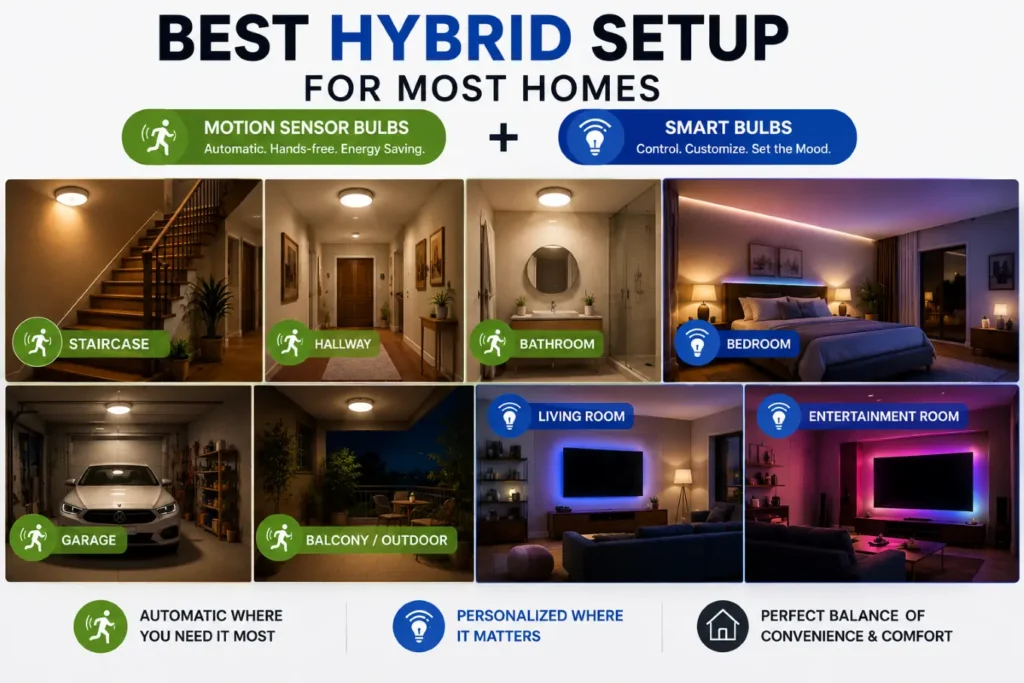
Many experienced homeowners eventually combine both.
That setup usually looks like this:
✓ Motion sensor bulbs for:
- Bathrooms
- Hallways
- Parking areas
- Staircases
✓ Smart bulbs for:
- Bedrooms
- Living rooms
- Entertainment spaces
That balance avoids unnecessary complexity while still adding modern convenience where it actually matters.
Pro Insight:
A fully “smart” home sounds exciting until guests, children, or elderly family members struggle with app-dependent controls. Simpler automation often performs better in shared households.
The Motion Sensor Bulb vs Smart Bulb debate really comes down to one thing: simplicity versus control.
Motion sensor bulbs remove effort entirely. Smart bulbs add flexibility and personalization. Neither option is universally better.
A garage, staircase, and bathroom have completely different lighting needs compared to a gaming room or modern living room. Most frustration happens when buyers expect one product to handle every situation perfectly.
FAQ: Motion Sensor Bulb vs Smart Bulb
Which is better: a motion sensor bulb or a smart bulb?
That depends on the room and the purpose.
A motion sensor bulb works better in places where people move in and out quickly, like hallways, staircases, bathrooms, and garages. A smart bulb makes more sense in bedrooms, living rooms, and entertainment areas where customization matters.
The better option is usually the one that removes the most daily frustration.
Do motion sensor bulbs need Wi-Fi?
No. Most motion sensor bulbs work independently without internet or apps.
The built-in PIR sensor detects movement and switches the light on automatically. That simplicity is one reason many homeowners prefer them for basic automation.
Can smart bulbs work without the internet?
Some smart bulbs continue basic functions through Bluetooth or previously saved schedules, but many features stop working without Wi-Fi.
Voice assistants, remote access, cloud automation, and app syncing usually require an internet connection.
Do motion sensor bulbs save more electricity than smart bulbs?
In most situations, yes. Motion sensor bulbs stay off until movement is detected. That naturally reduces unnecessary usage.
Smart bulbs can still save energy through dimming and scheduling, but they consume a small amount of standby power continuously for connectivity.
Are smart bulbs difficult to install?
Physical installation is easy because they screw into standard sockets like regular bulbs.
The complicated part is setup and maintenance:
- App pairing
- Wi-Fi connection
- Firmware updates
- Smart assistant integration
Some brands handle this smoothly. Others become frustrating quickly.
Can a motion sensor bulb stay on continuously?
Many models cannot. Some motion sensor bulbs only work in automatic detection mode. Higher-end versions may include manual override settings that allow continuous lighting when needed.
Checking product specifications before buying avoids disappointment later.
Which bulb is better for elderly people?
Motion sensor bulbs are often the easier option.
Automatic lighting removes the need to search for switches at night, and there’s no app learning curve involved.
Smart bulbs can still work well if voice assistants are already part of the home setup.
Do smart bulbs increase electricity bills?
Not significantly. Most LED smart bulbs remain energy efficient, but standby connectivity does consume a small amount of power even when the light appears off.
The convenience factor usually matters more than the tiny standby cost difference.
Are motion sensor bulbs good for bedrooms?
Usually not. Unexpected activation during sleep or limited manual control becomes annoying in bedrooms. Smart bulbs generally perform better there because brightness and schedules can be adjusted more precisely.
Can smart bulbs also detect motion?
Some advanced systems can.
A standard smart bulb normally does not include motion sensing unless paired with separate smart sensors or built-in automation hardware.
That setup increases both cost and complexity.
Which option lasts longer?
Build quality matters more than category.
Cheap motion sensor bulbs often fail because of low-quality sensors. Budget smart bulbs commonly develop app or connectivity issues before the LED itself dies.
Reliable brands usually last several years in normal household conditions.
Is a hybrid setup better than choosing one type?
For most homes, yes. A mixed setup solves practical problems more effectively:
| Area | Best Choice |
|---|---|
| Hallway | Motion Sensor Bulb |
| Bathroom | Motion Sensor Bulb |
| Bedroom | Smart Bulb |
| Gaming Room | Smart Bulb |
| Garage | Motion Sensor Bulb |
That combination delivers convenience without making the entire house dependent on apps and automation.